| ]

Why I am thinking of moving to own site,

brand name over a period of time

crawl rate on blogger not able to set to faster

Mostly title length is limited

manual work in adding keyword for every post.

page rank over years.


| 1 comments ]

503 Service Temporarily Unavailable

The server is temporarily unable to service your request due to maintenance downtime or capacity problems. Please try again later.
503 Service Unavailable Error On Wordpress Hosted At Dreamhost
If suddenly user users hit count goes high on wordpress blog then you will start seeing this error, I am looking at this error from last 7 hours, and within this seven hours, wordpress live chat did helped me to learn a lot. Here are few good links and findings.
First thing once your server comes back apply this Wordpress performance

Well What was the reason for this problem, it is Dreamhost shared hosting services have the script which kills the process if the number of hits goes some limit, and that is set by memory usage by particular process, on shared servers. Next thing to do is Finding Causes of Heavy Usage
For this you need to Enabling Shell Access for your wordpress blog/website.
And finally moving to dreamhost's private hosting service, its free for one week, here are few quick steps:
to move to the new PS server, you will want to go here: domains > manage domains
click 'edit' next to your domain; then you can move it to a different ftp user, select the 'create new user' option from the drop down menu, then set it to create the new user on your new PS, private server from dreamhost. don't forget to cheek the box, set it to 'move all files to new user'
once all the copying is done, you should see your domain start to resolve to the new location; to check this, just go to 'private servers' click 'manage resources' and done..
moving to Ps server? do i need to make any other settings?
this should be resolving as soon as dns updates for you;;
Once done with moving to PS server, use this Flush DNS but, basically it means waiting a bit for dns to udpate and that's valid reason for providing PS service free for one week's time.

| 0 comments ]

I am fan of FeedBurner and recently discovered about
How do I promote my FeedBurner feed on my Twitter account. This is what I was waiting from long time..
http://feedjit.com/siteIcons/32/feeds2.feedburner.com.gif
Here is simple two step guide for How To Promote FeedBurner Feed On Twitter Account?
Steps : login to feedburner
Select Account and click on publicize button.

from the left hand side select Socialize option.
This will open configuration options, which includes, Add a twitter account.
The Socialize service currently supports distribution on Twitter. This service is really good, hope they will start this for other social networks.
And activate it.
Only catch here is for twitter account, ie if you are running multiple sites or blogs you need to have multiple mail accounts for you to get twitter ID.

To ensure your feed updates in near real time, make sure you ping us immediately after your feed updates and that your blog platform is configured to use PubSubHubub. If none of these options are used for making your feed near real time, the Socialize service will look for and update with any new feed items every 30 minutes.
Read more configuration options

If you are a publisher and are not already using our Socialize service, From feedburner.google.com, visit the Publicize tab for your feed, select Socialize, Add the twitter account and click the [Activate] button at the bottom of the page. 

  1. How To Activate FeedBurner Ad Network
  2. Use PingShot To Increase Traffic To your Blog
  3. 2 Step Guide to Display More Adds In Feed

| 0 comments ]

why people fail in online money making..
There are thousands of people out there who want to make money online they try, and they fail, Why?
There can be lots of reasons to it, Making money online is about being there at the right time at the right place, If you want to make money online then you should see thats new and what can be done about it, You have to be able to find problems and solve those problems online.
The reason why people fail online can be many:
1.Lack of Skill: Internet is a very wide feild and you have to be able to have skill to make money online, you should have good understand of WWW, World wide web and how it works, You should have understand of how Google and other search engines work and basic Html too, If you have all these things in you, you will make money online.
2.Lack of hard work:Now you want to make money, but can you put in the hard work? can you work your self every day, 5-10 hours a day? If you can work every single day, then it will be easy for you to make money online, If you dont put in hard work, and do noting then results will be bad.
These are just two simple reasons, there are many.. please add your experiences as well.. 
Newbie Blogging Tips and Tricks To Earn Two Digit Earnings Daily. Here is the list for the blogging tips which will help you to earn at least two digit earnings per day.

Newbie Blogging Tips and Tricks To Earn Two ...

| ]

Add Or Submit Blog To Bing Search Engine.
Before adding your blog URL into Bing, first I will answer why to add your blog or site to bing.com. Well Bing is Second Biggest Search Engine after google.com.
Google still commands the US search engine market with 71.47%. Bing takes second place with 16.28% according to our StatCounter Global Stats data.

Source: StatCounter Global Stats - Browser Market Share


I guess this is enough to say about bing, and need to add my blog in bing.

Bing logo
Bing (formerly Live Search, Windows Live Search and MSN Search) is a web search engine. Microsoft's current incarnation of its search technology. Unveiled by Microsoft CEO Steve Ballmer on May 28, 2009 at the All Things Digital conference in San Diego, Bing is a replacement for Live Search. It went fully online on June 3, 2009.

Webmaster services

Bing allows webmasters to manage the web crawling status of their own websites through Bing Webmaster Center. Additionally, users may also submit contents to Bing via the following methods:


how to add site to bing search engine?
Its simple just use this link
Submit your site to Bing or direct link http://www.bing.com/docs/submit.aspx
Add Or Submit Blog To bingcom Search Engine

| ]

AdSense have added image ads to the bottom of link unit pages, this is great thing to increase the revenue. Also google is promoting link unit adds.

These image ads are contextually targeted, based on the link unit topic users clicked to reach the ads. If no image ads are available for the given topic, we'll only show the original text ads -- in other words, we won't show a PSA or insert a blank space in place of the image ad in this case. Advertisers can bid on these image ads on a cost-per-click (CPC) and cost-per-impression (CPM) basis, so you'll generate earnings for valid clicks and impressions. You can review the performance of image ads on your link unit pages by generating a link unit report on your Advanced Reports page.

If you aren't using link units on your pages, we encourage you to give them a try. They don't take up much space and can help add to your AdSense revenue --

| ]

HowTo Decide Right Title While Working With Google Trends?
Its been long time I was not playing with google and google trends. (To the fact - full busy with google trends.). Just an observation to get quickly indexed into google search.
Sometimes I wonder why my blog link is not getting indexed early.
Here are few tricks about google trend title.
For this I have used two blogs, both are having page rank of 3.
Today on google trends I have seen board of secondary education rajasthan, But I was late, to post about that, just thought of playing, and learnt the trick.
posted the info on blog 1 first, and posted the same info on blog 2.
Used the pingomatic to tell search engine that I have updated the blog.
To my surprise blog 2 got indexed first instead blog 1.
Reasons and observations.
1. Title
on blog 1 I have given same title as google trends. with that title google search engine was having enough info. So I guess it was checking to contents and so taking time.
On blog 2 I have given mix title which was not available on google blogs.
So blog 2 got listed first. Listing in google search engine as early as possible is exploring power of now in blogging.
2. Suggestions
If you are working on google trends. check for other blog titles and do not give same title as others, give mix of title to get indexed quickly.

Happy blogging.

| ]

Why and how to use social book marker newbie tips
If your blog is just newborn baby, then your page rank will be zero, even though you have great contents, but there is little traffic comes.
Ways to get traffic using social book marker services. [If new to blogging check Social Bookmarking in Plain English. Video]
use social bookmarker
Why To use social bookmarker?
The other day I got a mail from one of my favorite reader, saying his blog traffic is now going low, His most of the traffic comes form google search engine, but not it is becoming low. One should always see the other means of getting traffic. Search Engines are the best places but there are few more places to get traffic.
Search engine traffic comes based on page rank;
Social bookmarker are having high page rank so the equation goes like


traffic
search engines ==> social bookmarker ====>> Your blog ===> $$$
[High page rank] [low page rank]


How to Use social bookmarker effectively
  1. Create common login
  2. There are tons of social bookmarking site, and all needs you to register, Its one time registration. Create a common login and password for all the bookmarking site. Now first step is copy the URL of blog post, by edit post->right click on view post->copy shortcut(in internet explorer) else copy link location (in mozilla)

  3. Keep the good title
  4. This is title for social bookmarker, I like this because you can always play with title mix power. Title may not be same as your blog title, as your blog title have limited title length, and you should optimize it to get maximum out of it[Nothing comes free, you have to pay some price for free, here compromise on title length]. keep the title lengthy and include some keywords, read more about how to write search engine friendly blog post.
  5. keep summary description ready
  6. keep summary description as impressive as you can. May not be big, almost all bookmarker sites have limit on this description, so keep it short and sweet.
  7. Keep the keyword ready
  8. Do little brain storm and keep the keyword ready, generate your own keywords,
    there are few tools which help you to get keywords. But prefer your "mind blogging".
  9. Unselect few specially digg
  10. digg, from this year, digg is removing the links, - all my good links have been removed from digg without notice, do not keep in digg. Observation about digg.com is all links follows xyz.blogspot.com are being removed.
It is equally important to Check the page rank for new social bookmarker, before submit. Add a handy page rank checker toolbar for few days to speed up your activity.
Anything more you wish to add?

| ]

Social Bookmarking In Easy Way Most Used Links here.
When it comes to social bookmarking, socialmarker is my favorite, here are few more beta versions, If you still have question about social bookmarking you need to check this video explained in simple way.
Ping.fm
Ping.fm is a free (gratis) social networking and micro-blogging web service that enables users to post to multiple social networks simultaneously.

Making an update on Ping.fm pushes the update to a number of different social websites at once. This allows individuals using multiple social networks to update their status only once, without having to update it in all their social mediums individually. Ping.fm groups services into three categories – status updates, blogs, and micro-blogs – and updates can be sent to each group separately.
check Supported services by Ping.fm
and another one is hellotxt
Save time managing your status update for all your social networks.
Post updates by group to separate work and play. Aggregate and organize your friend's feeds.
Both of the above service support status update from web, mobile, sms, email, 3rd party applications, API to more than 35 social network.

| 0 comments ]

A lot has been written already, Just want to revise for my new blogger's.
To write search engine friendly blog post's is not rocket science, Just one has to consider few steps to catch it. Focus should be one three key area's, Title, content/Keywords, and Links.
Lets check out tips about Content/keywords and Links

  1. Keywords
  2. Design the keywords you want to promote in your blog post. Every blog post, you select one or two keywords to promote.
    For example if you decide to promote keyword “ap inter results”, you need put keyword “ap inter results” ONCE in your blog title, ONCE in bold, ONCE in italic, ONCE starting/middle of the blog post, and ONCE bottom of the blog post. (How to get keyword, use google trends)
    Newbie Note:- Do not flood your blog post with keywords, later of sooner it will be penalized.

  3. Content

  4. Write an blog post with quality content at least 200 - 500 words, original content.
    Newbie Note :-
    Do not write too much about your personal stuff, write more topics that a general person will like, and is interested in, search engine interest is directly proportional to general person interest.

  5. Content Format

  6. Short sentences, a lot of text breaks, use more dashes. Make your blog post read quickly.

  7. Outbound Links

  8. In your blog post, link to 1 or 2 high reputation site like http://en.wikipedia.org/
    Newbie Note :-
    Give some reputed links from wiki. simple search is use "your keyword + wiki" in google.

  9. Cross Links

  10. Link to on topic quality content across your site. Example If this blog post is about ap inter results, then make sure it links to your older posts like inter results links sites, about ap inter exams.
    Newbie Note :-
    Just search in your blog, with your keyword/title, go to edit post, you will see search option there just beside new post button, after you searched for previous related post, select the post to be linked, right click on "view" then "copy link location", the link to be given cross link is copied to your dashboard, just paste it on related search using "link" button in compose/edit html area.

Title
Another focus while writing search engine friendly blog posts is TITLE,
quick guidelines for writing title.
  1. Do not give short titles,
  2. Every letter of title should be capital.
  3. Title should include Keyword, for what about the post is.

Few points to consider before you press publish post button.
  • Do spell check.
  • Check for Un-necessary HTML code, Most important check if any html code is present in your post, this can happen, if you have copied something from other place, sometimes it my happen that you have copied their google absence code also. And if you are making draft post in Microsoft word, there you are doing text formatting, and copying it in blogger, then lot of html conversion code appears when you copy from word to blog post. Better is just use blogger's "compose" area, you can do all coloring and stuff like microsoft word here.
  • Tell to search engine about your blog updates. Ping once you update the blog. using pingomatic , pingshot or google blogger ping.
    Just ping whenever you update the post, not every time, else it will be treated as spam.

Dear reader's Share your knowledge also.

| ]

Social Networking in Plain English A short explanation of social networking websites and why they are popular.


A quick and plain English intro the micro-blogging service Twitter
Twitter in Plain English

| ]

With blogging explained in plain English not time to move one for Social Bookmarking in Plain English, A short explanation of the features and benefits of Social Bookmarking sites like Delicious.com.

Digg is more interesting stuff than del icio us, but works same as delicious.com,
delicious.com is the oldest method of social bookmarking thank digg. I am fan of digg, but digg banned me, and I am still going live on delicious.com.

| ]

Blogs in Plain English Explained for New blogger. Finally someone who explains blogs easily and to the point and answers to questions like What is blog? How blog works?
How posts looks like in blog? What is Importance of Read Quote and Link to other blogs? If you have such questions check out this video A great intro to Beginners. Very quick learning about BLOG with creative and simple animations.

This short animated video will help you understand the basic concepts of the Blog.


A video for people who wonder why blogs are such a big deal.

| 0 comments ]

Its my pleasure to say that with my blogging tips people are getting 100$ per month. Check out this guy who is earning 100$/month, using my blog tips.

For beginners To get into Google Adsense program, I believe you should have something=unique on your blog/site, then next important thing is you must be indexed into alt-least one search engine, your blog is not yet indexed into google or yahoo search engine, do it Now, Here is 10 step guide to get indexed into Google.

To get quickly indexed in google, Have some ORIGINAL contents, write at least 10 posts, submit your blog to search engine and various sites,

How to submit blog/site to google search engine?
Before you begin, login to blogspot.com and be ready with your blog URL, (don't close this window you need to visit blog settings soon)

  1. Add URL to Google search engine using this link or direct link http://www.google.com/addurl/
  2. Go to webmasters tools https://www.google.com/webmasters/tools/dashboard
  3. Copy and paste your blog URL Now press add site,
  4. Then it will go to next page which says Verify your ownership to view detailed statistics and errors for it.
    and Next Step
    Verify your site. By verifying your site you can access comprehensive statistics and crawl errors about the pages in your site.
  5. Click on verify your site
    default status it will show as
    Verification status: NOT VERIFIED (shows in red)
  6. Choose verification method
    Generally for blogspot platform choose verification method as "Add a meta tag",
    Place meta tag after the "" tag and before the "" tag
    example shown there. (Keep this window open you need to come back here again.)
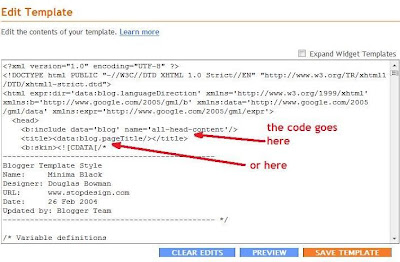
  7. Copy this meta tag, Then go to http://www.blogger.com/home, click on blog layout, go to edit HTML tab and place the code as shown in example, exactly under "head" tag,
    If you are seeing this code in blogsopt.com for the first time then just copy meta tag code from webmaster below line number seven.
  8. Then click on save template.
  9. Now come back to google webmaster tools,
    And click on verify.
  10. This will take few second,
    and your new status will be
    Verification status: VERIFIED

  11. Next step is to add site map
    Go to sitemaps under google webmaster, (left side toolbar)
    There just copy "atom.xml?redirect=false" and press on submit sitemap,

    This will take Few minutes to get sitemap uploaded.

Check after few minutes (max five minutes), all your pages will be in URLs submitted, you can view the details for what pages are included and how sitemap looks just type your blog url before "atom.xml?redirect=false"

same steps are valid for adding your site into yahoo search engine, only site urls will differ check Google.

For more tips and tricks visit
Money Making Tips From Blogging.

If you think your writing is good feel free to write at www.bolmamabol.com ; Will provide your blog link at the end (your blog marketing for free), send mail at admin[at]bolmamabol[dot]com

| ]

Importance of blog it first. Today I have started to check google trends and seen about Adam Lambert search, I was having some work so I was late to post about that search. Later I posted it.
Here are Results and Conclusion of Posting it early.
Observations on Posting late.

  1. The search for Adam Lambert video 4/07/09 shows my link at fourth place, even though my page rank is 3.
  2. and bashhh.blogspot comes at second position even though its page rank is 2. That is power of blog it first.
Observations on posting it Now.
Later today I have posted " mi shivajiraje bhosale boltoy marathi movie" about to release, on my new blog just one month old, and see the magic traffic here,
In this post no extra keywords, no bold letters, no SEO stuff, and not much worried on blog title, still getting traffic to this post.
Results on Posting early.
In summary, Most important lesson for the day for me, I should not keep the idea's in my mind draft, whenever it comes, post it, like there is no tomorrow.
Use power of NOW

| 1 comments ]

You have great contents in blog, but still worried that there are less or no visitors for that post. DOOSH || what I missed, Yes I missed on Blog POST Title decision. Here is quick checklist and tricks Before giving and deciding your blog title. This will help you to Improve your search engine friendships.

  1. What does blog title mean to search engine?
  2. Its URL containing keywords for the search user is doing.
  3. What does blog title mean to blogger?
  4. Its URL containing keywords which drives traffic from search engines to the blog, Most important one once you do publish post, and later you can't modify the post title, so before giving title Think about it.
  5. Why to care on blog title?
  6. Most of the time I get comments on my other blogs saying your title is not good, well but I do care about that.
My experience about blogger says that I have very little world count on blog title.
If I give more count initial letters in title like "UniversityAdmissions" then my indexed title will become two or three words title.
  1. My Tricks of Giving Blog Title

  2. Use short letter words in title.
  3. Don't give small Titles.

  4. This type of giving short title is not much useful. Give meaningful titles which includes keywords also, not like this.
  5. Do not count on common letters.

  6. common letters like 'a', 'and', 'the', '&', will get ignored by search engines, and so not included in blog title URL even though you use it.
  7. Give less word count letters more in title.

  8. If you want all your keywords to get included in URL then give small characters count words in title. This makes your chance to get all letters/words in URL. This is perfect example, how-to-decide-on-right-blog-post-title. All the words are included in URL.
  9. One last Trick On Blog Post title

  10. Title words congaing '.' or '-' or '|' is having chance of getting included into title URL. If you want to have big title try adding these characters.
    Once you practice these it will come automatically from your mind blogging.
More Tips from Google Search Engine
The title of your post is one of the most important things when it comes to not only being SEO-friendly but also to attracting readers.
Make your title clear, to-the-point and include keywords. Here are some examples:

* “He’s Done it Again” or “Happy Times” or “So Sad…”

some better examples:

* “Clay Aiken Has Topped the Charts Again” or “Thanksgiving Turkey Recipes: Happy Times” or “Mumbai Terrorist Attack: So Sad…”

you get those descriptive key words in there.

Get specific because, usually, your readers are looking for specific information.

| 0 comments ]

Yaa I am writing about, What blogging Demands from New blogger? Why I am writing about this, I am happy to say that, I have reached certain level in blogging, in terms of earnings (This month crossed 750$.. Kudos..I can think of purchasing laptop in a months time). Also getting really good response to my blogs like never before. Getting appreciation mails from friends. First person to write me was Mr. Shaik Mastan Baba from Hyderabad. Now a regular SMS friend of mine.
I guess this is longest post I have ever written, Do you like lengthy post or short posts.
Today I just got one more mail Chethan Thimmappa with subject as "Hi Bhagwat! I AM UR FAN" initially I thought it is spam, but got chance to open it and results is this post.
Back to the question, What Blogging Demands From New Blogger? Instead answering directly to the question, rather I prefer to say about How I blog?
Well I am not a full time blogger, Daily I spare two hours time from my work. This is very difficult to get two hours time from day work, if you are a software engineer then you should know hows life of software engineer.(exactly one year before I posted this, was my first from mind blogging)
Yes I spare one hour before my lunch time, and one hour in morning before going to office. This is my dedicated two hours time in weekdays for blogging. you must be wondering in two hours time how can I make these many posts. These two hours I manage very efficiently, I quickly go through my google reader feeds. check out for any new ideas, or info, check mails respond to the comments (Lata-my wife helps me in these two activities), moderate comments, and quick reading about information.
I sit in night at least for two hours, for reading and experimenting about new ideas.
1. So first lesson - put aside dedicated time for blogging, this way you will train your mind for dedicated blogging.

2. Do mind blogging.
Yes I do mind blogging most of the time. I think about blogging whenever I get time, my favorite place is bathroom, whenever I take bath I get lot of ideas (Lata Complains always why I take more time to bath). While driving also I think about how i can improve my blog contents. Train your mind for blogging. There is lot of thinking power in everybody's unconscious mind, train that mind for blogging and you see wonders.

3. Keep the Ideas
I do keep ideas in drafts, whatever idea comes, and on that I do Google, read on that and then do some experimentation, and most important share the results. Sharing blogging results is like giving back to the universe, from MIND BLOGGING. (Am I writing book on MIND BLOGGING?? I guess I can write book one day).

4. Common ABC for Blogging.
a. Like most successful blogger follows, focus on quality rather than quantity. Not necessary to post daily, but if you post quality and do mind blogging you will see results.
b. Learn a bit of HTML and PHP(PHP if you want to start your own site for long run).
c. Good written English - this will come if you do mind English speaking, speak in English with friends and avoid writing short letter like "U" instead of "you". Keep it simple, I try hard to keep my English simple but it goes like HANUMAN TAIL..

5. Finally Add "D" for blogging from you.

Like Chethan mentioned in his mail that He left click exchange program, That's good, but he can share his experience about click exchange programs, I did not do click exchange.

Rule of thumb, to be followed be follower of someone, Track the masters, Ask the masters and become follower of masters, you are better judge to decide on your masters.

There is no substitute for HARD WORK.

| 0 comments ]

How to add keyword for each blog post. I was doing mind blogging for this question from long time, but was not getting time to pen it down. With my previous post about adding keyword description explained in simple terms, now time to move on further and add keyword for each popular blog post.
This is very simple than I thought. Go to Layout -> edit HTML -> under this
Find

b:if cond='data:blog.url ==
This is The code line you need to use in order to add meta descriptions and keywords for each popular blog post. http://lh3.ggpht.com/andrei.agavriloaiei/SACU2BlScBI/AAAAAAAAALU/hw3Ltu4T2-8/s400/template.jpgConsider that this blog only contains two articles published in February and March, 2008 and that their titles are "My First blog post" and "My second blog post". The permanent links (permalinks) to these two post pages will be: http://___.blogspot.com/2008/02/my-first-blog-post.html
http://__.blogspot.com/2008/03/my-second-blog-post.html

Add these two line in separate code block at url==. The code looks like
b:if cond='data:blog.url == http://___.blogspot.com/2008/02/my-first-blog-post.html
meta content='DESCRIPTION' name='description' and meta content='KEYWORDS' name='keywords'
close the if condition
and for second link it looks like
b:if cond='data:blog.url == http://___.blogspot.com/2008/02/my-second-blog-post.html
meta content='DESCRIPTION' name='description' and meta content='KEYWORDS' name='keywords'
close the if condition
This way you can add keyword description under meta tag for each popular blog post.
check out blogger help page.
But be aware not to flood with keyword density. check out your limit with keyword density checker.

| ]

Blogging for next level; Yes you got a blog and got indexed in google, with some pages indexed in google, you are getting quite good traffic on your blog, so you feel good, well be aware your work is more if you want to earn more. So what to do for next level of blogging?
Search out most popular links
First list out popular links on your blog, well there are number of ways to do it, I follow google analytics top pages of the month and simple & feedjit. After deciding on popular pages, now blogging for next level begins,
works to do:- Add more related keywords in that post, if possible add some widgets, in this age of advertising everybody is giving free widgets, put some related videos.
Next - make the keywords bold.
If possible try to put more adds on that page, where traffic is more, more adds means more revenue.
And most important provide internal links and reference.
Give internal links and references to drive traffic to other posts.
check out my top ten guidelines for new bloggers.
Blogging for next level; more to come.

| ]

I was missed this option of feedburner in some of my blogs. This was enabled in some of the blogs. well what is PingShot?
Most web-based feed reading services will check for updates on their own time. with pingshot Choose the services you want to ping, and feedburner will notify them when you publish new content.
Why to use ping services?
Pinging lets dozens of services know you have updated your site and increases traffic to your blog.

1. Click the Publicize tab.
How do I promote my FeedBurner feed on my Blogger site?

2. locate PingShot
3. With default services and add plus up to five additional services.
* Blog Buzz Machine
* FeedBlitz
* Google Blog Search Pinging Service
* Blogblogs
* Alexa
4. save

email this
Blog Widget by LinkWithin

Search This Blog

New to Blogging? Check out My Blogging Experiments To help you Earn Three Digits Daily.

Recent Posts